

Almost every flawless magazine photo you’ve admired has one thing in common: frequency separation. It’s a quiet trick that smooths skin while keeping it real.
Retouched skin in portfolio-quality portraits can look effortless and natural, but it usually comes from one classic technique: frequency separation retouching. With Aperty, that “pro secret” becomes much easier to use, helping you smooth skin while keeping pores, fine texture, and real detail intact for a polished, professional finish.Even if it sounds advanced, the concept is simple. Aperty’s split frequency retouching tools separate skin texture from color, so you can correct tone and refine texture with precise control without slipping into an over-smoothed, plastic look.
Why Frequency Separation Became a Retoucher’s Secret Weapon
Each portrait presents the same issue: real skin is never perfectly smooth. The camera records all this: the texture, the imperfections in color, the minute flaws, the errant hairs. A simple skin smooth can impart a very funereal look, but using Aperty allows you to tweak the skin to a natural-looking finish.
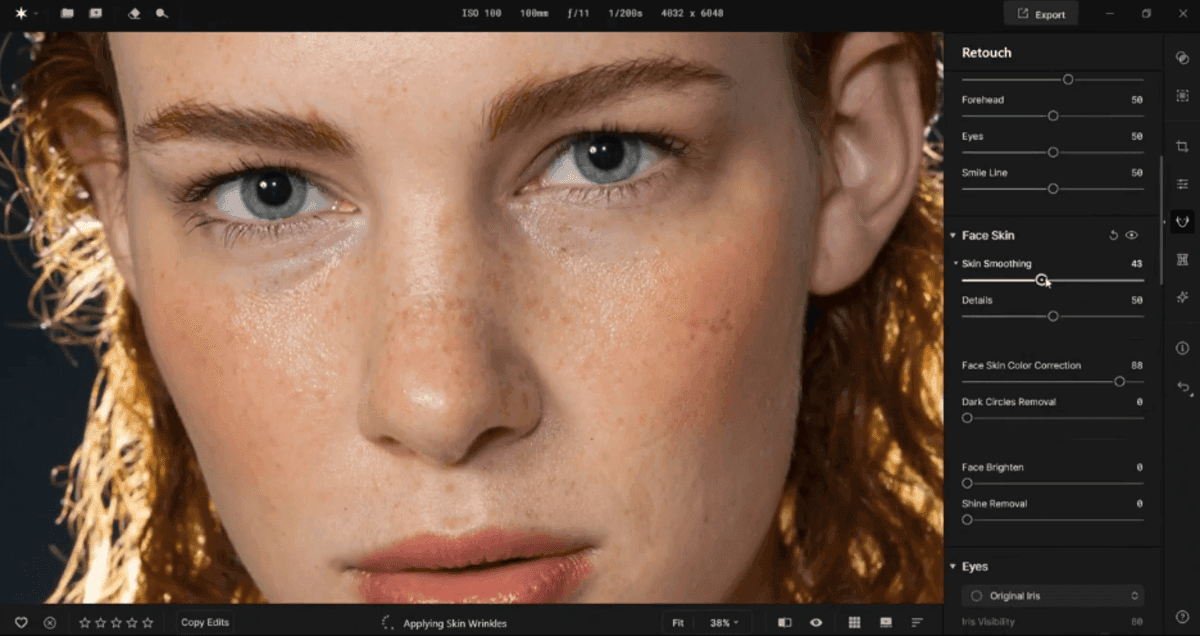
This technique breaks an image into two components:
• A low-frequency layer for color and tonal gradients.• A high-frequency layer for texture and fine details.By splitting the layers, a retoucher can work on tone and texture separately. For example, they can even out blotchy areas on the soft layer without touching the pore detail. This is why editorial photographers and commercial retouchers prefer such a method.
Understanding the Core: What Is Frequency Separation in Photo Editing
To better understand its power, what exactly is frequency separation in photo editing? Essentially, it’s a technique that breaks a photo into two working parts so tone and texture can be adjusted independently.Say the cheeks look a bit blotchy, or the foundation isn’t blending smoothly. You can fix the color and transitions without “smearing” the skin detail. And if the issue is texture, little bumps, flyaway hairs, or small distractions, you can remove them while the portrait’s natural shadows and contours stay the same. It’s also handy for clothing and products: reduce wrinkles without flattening the fabric, and calm shiny reflections without sacrificing sharp lines.This separation lets you remove imperfections without sacrificing the fine details that make skin look real. Many professional retouchers even call it the “bridge between realism and perfection.”
Your portrait editing continues in Luminar
Discover LuminarBreaking Down the Frequency Separation Steps
Split frequency retouching can sound technical, but Aperty turns it into a clear, repeatable workflow you can learn fast.
• Step 1: Split texture from color. Use Aperty’s split frequency retouching tools to separate skin texture from tone.• Step 2: Smooth tone first. Apply precise color correction to even out redness, blotchiness, and harsh transitions.• Step 3: Refine texture next. Adjust skin smoothing with control, keeping pores and natural detail visible.• Step 4: Choose your intensity. Keep it subtle for realistic portraits or push it further for beauty edits.• Step 5: Double-check consistency. Review different areas to ensure it works across all skin types and tones.• Step 6: Finish and enjoy the result. You get fast, professional-looking skin with a natural, believable finish.


With this easy-to-follow approach, Aperty helps you retouch faster while keeping the skin looking real.
Dialing in the Perfect Frequency Separation Settings

Each image has its frequency profile, meaning that the settings for frequency separation can’t be identical for every image. The optimal value of blur also depends on image resolution, lighting conditions, and the distance of the subject.Hence, a close-cropped beauty shot may only require 4-6 pixels of blur, but a fashion shot could require 10-15 pixels of it. The trick is in getting just enough blur so that the texture is gone, but the form remains.Experienced retouchers are always toggling layer visibility on and off as they strive to achieve the right level. When you can’t tell where the softening starts or ends, you’ve found the right balance: not too much, and the waxiness of the skin becomes visible. Insufficient coverage can also cause the color bands to show through.
Mastering Subtlety: The Difference Between Retouching and Over-Retouching

The most obvious clue to an amateur retouch is over-smoothing. Skin has texture. It breathes, it shines, it reacts to light. That’s what frequency separation is meant to bring out, not eliminate.This is what a skilled retoucher would do to balance the lighting, remove blemishes, and blend the tone together, while still allowing the natural texture of human skin to come through. Quick test? Zoom back out. If it still looks like real skin under that light, then you are good. If it’s like porcelain, then take a step back. Retouchers also often pair this method with dodge and burn to add depth, shaping shadows and highlights in a controlled way that keeps the portrait looking realistic.
Merging Manual Skill with AI Smoothness

An can speed up the first round of retouching a lot. They scan the face, spot uneven tone or texture, and apply small, targeted fixes that mimic a skilled editor’s work. When an expert’s artistry matters, editors often use AI smoothing for quick tone correction, then refine the texture manually with classic frequency separation techniques. For example, one might use AI to even out the overall tone first, then manually refine the key areas, like the eyes, mouth, and hairline, to keep the portrait looking natural.In practice, this combo saves time because the “boring cleanup” happens fast, while the final look still comes from human judgment. A quick before/after check at normal zoom usually tells the truth: if the skin still has life and texture, the balance is right.
Beyond Portraits: Expanding the Technique
Although that’s what it is most associated with, frequency separation applies way beyond the skin. Product photographers use it to eliminate fabric wrinkles or reflections on metals, while fashion editors use it to refine details in the textures of clothing without compromising the tones of fabrics.

This technique works wonders, even in fine arts or boudoir works intended to be intimate and subtle. Knowing , the method allows you to smooth out and equalize the tone, still preserving the gradient and texture of the light. This sensitivity to realism is how you protect the integrity of the image.

Frequency Separation in Practice: An Example Workflow
To show how a portrait retouch looks in real work, here’s a simple workflow using Aperty:
1. Start with a quick cleanup. Clean up blemishes using the Healing Brush.2. Turn on the frequency separator. Use Aperty’s separator to split skin texture from color, so you can adjust each part without affecting the other.3. Even out skin tone. Smooth transitions between shadow and highlight zones.4. Refine texture gently. Use the Clone Stamp or Healing tool on the high layer to refine details.5. Polish key features. If needed, adjust makeup, reshape facial features subtly, and brighten eyes for a fresher look.


It may take around 10-20 minutes per image, depending on the level of editing required.
Your portrait editing continues in Luminar
Discover LuminarAvoiding Common Pitfalls

Frequency separation can go wrong, even for pros. Stay away from these mistakes:
• Pushing tools to 100%: heavy settings can flatten texture fast, especially on highlights.• Too much softening: wipes out depth and shadow detail, making skin look waxy.• Incorrect blending modes: can create harsh contrast, halos, or strange edge artifacts.• Ignoring lighting direction: leads to unnatural shading.• Editing only at high zoom levels: creates inconsistencies when viewed at normal size.If you’re using Aperty, the same rules apply: just easier to manage. Keep adjustments subtle, toggle the before/after often, and step back to fit-to-screen view to check realism. Work gently and follow the light. Instead of removing everything, aim for a clean, harmonious result, then stop early rather than late.
Wrapping Up
Frequency separation retouching is more than a trick; it is the point at which tone and texture come together. Whether it’s done by hand, supported by smart tools, or accelerated with AI precision, this technique sits at the core of professional-looking skin retouching, and Aperty makes that workflow faster and easier without losing realism.As image editing evolves, one thing stays the same: tools can speed up the process, but they can’t replace a trained eye. Frequency separation proves how powerful a balanced approach can be using technology for control and efficiency, while the artist decides what still looks human.


